Making Figma Easier for AI Agents
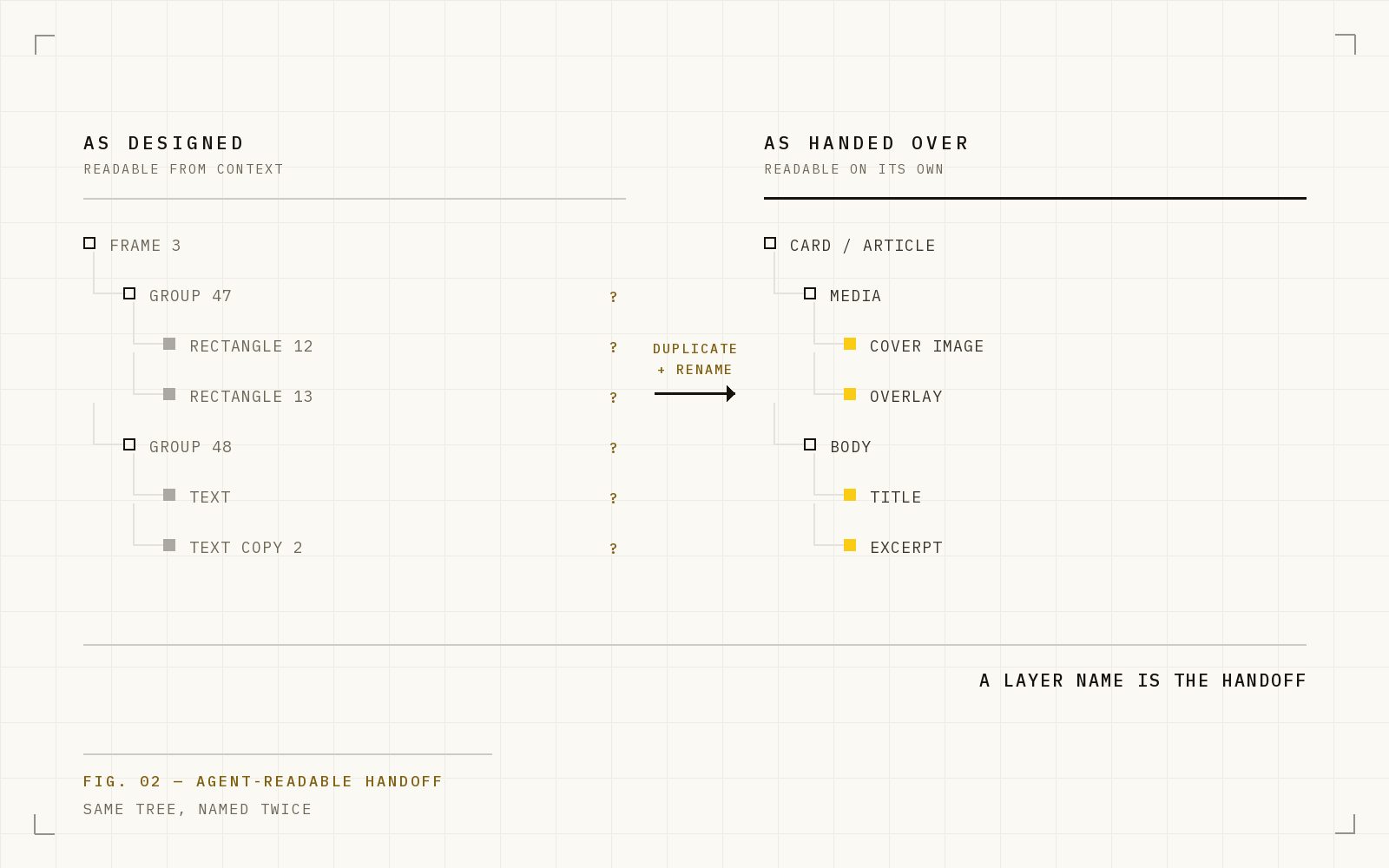
A Figma design can look right to a person but still be difficult for an AI coding agent to understand. A cleaner duplicate gives design and development teams a better shared handoff.
A Figma design can look completely clear to a person and still be surprisingly difficult for an AI coding agent to understand.
That is not a criticism of the designer. Designers create files for exploration, review and collaboration. They can see the canvas, understand the visual hierarchy and recognise that several nearby elements belong together.
An agent cannot rely on that visual intuition alone. It also reads the structure underneath the design. If that structure is unclear, it has to guess what is a section, what is a button, which image belongs where and how the page should behave when the screen changes size.
I ran into this while turning designs into production pages for a recent client. The designs looked right. The problem was the handoff between the Figma file and the coding agent.
So I wrote a skill called figma-agent-restructure.
The gap between looking right and being easy to build
A traditional design handoff tells a developer what the finished interface should look like:
- the spacing;
- the colours and typography;
- the images;
- the content;
- the intended hierarchy;
- the behaviour on different screen sizes.
That remains important. But an AI-assisted handoff needs another layer: the file should make its intent understandable without relying on somebody looking over the agent’s shoulder.
For example, a designer can see that a photograph, heading and button form one hero section. An agent may instead see three unrelated layers positioned near each other. A person knows that five cards use the same colour. An agent may see five separate colour values. A person recognises a logo immediately. An agent may only see an unnamed vector inside a group.
The design is not wrong. It was simply organised for a different reader.
Where agents tend to struggle
Most of the problems are ordinary things that design and development teams already encounter during handoff.
Unclear names
Layers called Frame 482, Rectangle 91 and Group 37 make sense while somebody is working visually. They do not explain much to the next person—or agent—opening the file.
Names such as Hero, Enquiry button, Event card and Stadium image make the purpose much clearer.
Visual groups that are not actual groups
Several elements can look like one section on the canvas without being connected in the file. A developer can often work out the relationship. An agent may reproduce the appearance while missing how the section should flow or resize.
Repeated decisions that are not reusable
The same colour, spacing or text style may appear throughout a design without being defined once and reused. That makes it harder to tell whether two elements are intentionally the same or merely look similar.
Images hidden inside other layers
An image may be used as the background of a frame that also contains text, overlays and effects. If the handoff is unclear, an agent can export the whole frame as one flat image instead of identifying the original asset.
Reviews based on small screenshots
A full-page thumbnail can look convincing while hiding broken text, incorrect wrapping or a missing image. The implementation needs to be compared with the source section by section, at a useful size.
None of these problems means the design team has worked badly. They simply create ambiguity at the exact point where design becomes development.
Do not make designers change how they work
The obvious response would be to impose strict rules on every working Figma file.
I do not think that is the best answer.
A designer’s source file should remain useful for designing: exploring ideas, trying alternatives, gathering feedback and making visual decisions. Turning that working file into a rigid engineering document can slow the design team down.
Instead, the skill creates a separate copy.
- The original file remains the design team’s source.
- The duplicate becomes the clearer handoff for development and coding agents.
The duplicate should look the same. What changes is the organisation underneath.
What the restructuring skill does
The process is deliberately straightforward.
1. Understand the source
The agent first reviews the original design without changing it. It records how each section looks, reads the copy and identifies the images, colours, text styles and effects that need to be preserved.
2. Create a new Figma file
The cleaned version is built separately. The original remains untouched, so the design team can keep working in the file they know.
3. Give the page a clear structure
The duplicate places sections in reading order and gives important layers names that describe their purpose. It makes relationships explicit rather than leaving the next agent to infer them from coordinates.
4. Make repeated choices reusable
Shared colours and other repeated decisions are defined consistently. Images are transferred deliberately. Text is given enough information to wrap and resize predictably.
5. Compare the copy with the original
The agent checks the rebuilt file section by section. The task is not complete merely because the layers look tidy. The duplicate must remain visually faithful to the source.
What each team gets from this
This is not only an optimisation for the coding agent. It improves the handoff for everybody involved.
For designers
- Their working file remains untouched.
- They do not have to redesign the page around the limitations of an AI tool.
- Visual details and original assets are preserved.
- They have a clearer artefact to review with development.
For developers
- Sections and assets are easier to identify.
- Intended relationships are clearer before coding starts.
- There is less time spent reverse-engineering the canvas.
- Changes in later design versions are easier to locate and compare.
For coding agents
- There are fewer gaps to interpret.
- The page order and component roles are clearer.
- Repeated design decisions are easier to reproduce consistently.
- Visual checks can be made against a more predictable source.
The important result is not simply faster code generation. It is less avoidable disagreement between the design, the implementation and the people reviewing both.
When this is useful
Not every Figma file needs restructuring.
If a design already has clear names, sensible groups, reusable styles and an obvious reading order, the coding agent may be able to use it directly.
The extra step becomes valuable when:
- the design is visually strong but structurally difficult to inspect;
- a coding agent keeps misunderstanding sections or assets;
- design changes are difficult to compare with the existing build;
- the team wants to protect the designer’s working file;
- development is spending too much time interpreting the handoff.
It is a translation layer, not a new design process.
A shared handoff for design and development
Designers and developers have always needed a shared language. AI coding agents make that need more visible because they cannot quietly fill every gap using human context.
A cleaner duplicate gives all three participants something useful:
- the designer keeps a flexible creative source;
- the developer gets an understandable implementation handoff;
- the agent gets a document it can read with fewer assumptions.
The original design remains the authority for how the page should look. The duplicate makes that design easier to build faithfully.
Sometimes improving AI-generated code does not start with a better prompt. It starts by making the source material easier to understand.
Appendix: figma-agent-restructure skill
---
name: figma-agent-restructure
description: Rebuild a messy Figma composition into a clean, agent-readable copy in a NEW Figma file — semantic layer names, auto-layout, colour variables, images transferred, source file untouched. Use when the user shares a Figma file/node URL and asks to restructure it, clean it up, convert it to a better file structure, or make it agent-friendly/agent-readable — including when hf-landing-page's Figma audit flags a messy file and the user approves a rebuild. Not for design-to-code or building website pages (use hf-frontend / hf-landing-page), and not for creating new designs from scratch.
---

# Figma Agent Restructure

Rebuild one composition (a frame/section in a source Figma file) in a new file so agents can read it deterministically: sections named by role, auto-layout instead of loose absolute nodes, repeated colours bound to variables, every raster transferred. This is the rebuild procedure `hf-landing-page`'s complexity assessment routes to (`.agents/skills/project/hf-landing-page/references/figma-audit.md`).

## Required Order

1. Load Figma MCP tools in ONE ToolSearch call (`select:mcp__figma__get_metadata,mcp__figma__use_figma,mcp__figma__get_screenshot,mcp__figma__create_new_file,mcp__figma__download_assets,mcp__figma__upload_assets,mcp__figma__whoami`). Load the `figma-use` skill before any `use_figma` call and `figma-create-new-file` before `create_new_file`.
2. **Audit the source read-only**: `get_metadata` + baseline `get_screenshot`, then `use_figma` reads for what metadata hides — full fill stacks + node opacity + effects (watch for `visible: false` paints and stacked-opacity tricks), `getStyledTextSegments(['fills','fontName','fontSize'])` on every text (two-tone headings and bold ranges return `figma.mixed` to plain reads), exact copy, image-fill inventory, radii, gradient stops/transforms. Use the audit script in `references/recipes.md`.
3. **Create the new file**: `whoami` → planKey (ask only if multiple plans); pass the HF team `projectId` when known; name the file after the composition.
4. **Rebuild**: one root vertical auto-layout frame; sections in reading order named `section/<Role>`; rasters as placeholder rectangles named `img/<what it shows>`; CTAs `btn/<label>`, tags `tag/<label>`, cards `card/<role>`, overlays `overlay/<what>`. Colour variable collection bound to every fill/stroke/text via `setBoundVariableForPaint` with explicit scopes. Small `use_figma` calls (~10 ops), return node IDs each call.
5. **Transfer assets** per `references/recipes.md`: per-node `download_assets` exports → scratchpad → `upload_assets(nodeId)` POSTs. Temp-clone recipe for image fills that have children; SVG strip-and-reimport for vector wordmarks.
6. **Verify at full resolution**: screenshot section-by-section at `maxDimension ≥ 1200` against the source, run the white-fill sweep, fix everything, only then hand over. Report what was checked.
7. Hand over the plain file URL on its own line plus: structure map, naming contract, variables, and preserved source quirks.

## Non-Negotiable Rules

- **ONE page, ONE rebuilt frame.** No Cover / Foundations / Components pages, no component sets, unless the user explicitly asks. (User feedback 2026-07-14: the DS treatment was rejected as bloat.)
- **Never mutate the source file** beyond the net-zero temp-clone recipe — always delete the clone.
- **Preserve source content verbatim**, typos included; list quirks in the summary instead of fixing them.
- **`createAutoLayout`/`createFrame` default to WHITE fills** — set `fills = []` on every pure layout container at creation and run the sweep before verifying.
- **Wrapping text needs `textAutoResize = 'HEIGHT'` + explicit `resize()` width.** `FILL` alone collapses text to a zero-width thread.
- **Never verify from a small thumbnail** — full-page thumbnails hid shipped defects once already.
- Never rasterise or retype a vector wordmark.

## References

- `references/recipes.md` — tested code: source audit, stacked-opacity detection, mixed-range text, image transfer, temp-clone export, SVG cleanup, white-fill sweep, wrapping text.
- `.agents/skills/project/hf-landing-page/references/figma-audit.md` — the complexity signals that trigger this rebuild.

## Validation

- White-fill sweep returns `[]` (see recipes).
- `root.findAll(n => n.type === 'TEXT' && n.width < 2).length === 0`.
- Section-by-section screenshots at `maxDimension ≥ 1200` match the source baseline.